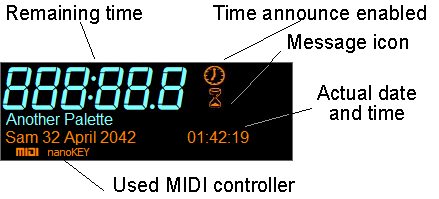
The display shows you informations regarding the jingles, functionalities and time.
The remaining time is displayed for the first jingle to be ended. It shows second tenths, seconds on two digits, minutes on three digits if required.
The remaining time color changes to warn you when there are only 3 seconds left of the jingle. The warn and color can be customized from the Settings window.
The clock sign is displayed only when Time announce function is turned on. It disappears when Time announcing is turned off.
The message icon appears when Jingle Palette has a message for you. In the above example, the red hourglass means that Jingle Palette is busy (for example palette loading) and the floppy disk shows that save completed successfully. The floppy disk can also indicate that a palette has been changed but not saved. The framed "X" means that there is an error. The bell means that you have support forum notification, if your username/password has been entered in the settings. Moving the mouse above the sign will pop up a balloon with the description of the event. Clicking it will turn the warning off (and opens the default web browser to acceed to notifications, if the icon is the bell).
The clock displays the current time in 24 hours or 12 hours AM/PM formats. This can be chosen in the Settings window.
The current palette name is displayed under the remaining time, and can be hidden by clicking on the display area or in the Settings window.
The current date can also be displayed in several ways, see the Settings window for details.
If MIDI is enabled in the Display & MIDI tab of Settings window, the selected MIDI device will be displayed here.